Anchor + Null
Move the anchor point with a nine-position grid and create a 2D or 3D null at the center of the selection.

Anchor points, nulls, easing and asset management in a compact panel for everyday work.
MARDINI TOOLS combines four everyday animation tasks: adjusting keyframe easing, moving anchor points, creating a null for selected layers and organizing project files.
 View full screenshot ↗
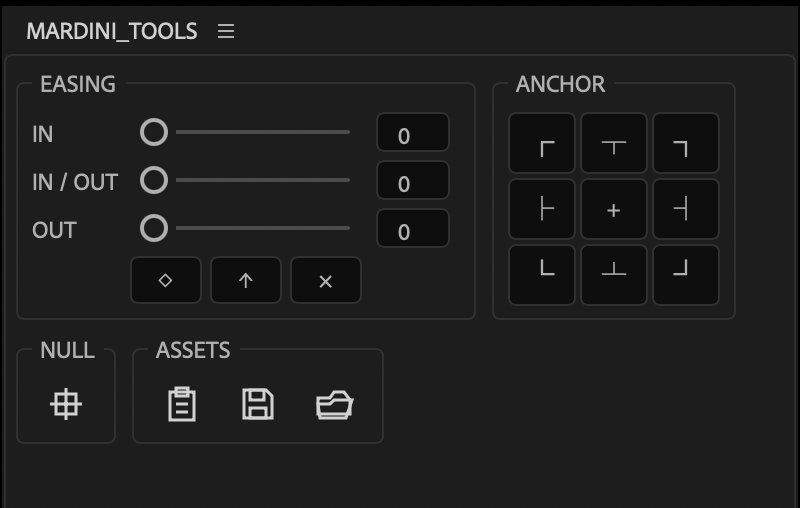
EASING applies incoming (IN), outgoing (OUT) or both influences to selected keyframes. The diamond adds a key at the current time, the arrow reads the influence of one selected key and × resets selected keys to linear. ANCHOR moves the anchor point to one of nine positions. NULL creates a central 2D or 3D null and parents the selection to it. ASSETS, from left to right: paste and import from the clipboard, collect selected sources into Assets and open that folder.
Actual panel screenshots. Button labels are kept as they appear in the interface.
Move the anchor point with a nine-position grid and create a 2D or 3D null at the center of the selection.
Adjust incoming and outgoing influence, read a keyframe, add keys at the current time or return to linear interpolation.
Paste images or files from the clipboard, collect selected sources and open the Assets folder from the panel.
Steps to install this version of MARDINI TOOLS.
Download the ZIP on this page and find MARDINI_TOOLS.jsx. No installer needs to be run.
Place MARDINI_TOOLS.jsx in your installation’s Scripts/ScriptUI Panels folder. Copy the JSX file, not the entire ZIP.
Find the script in the Window menu. Open the panel and dock it in your workspace.
To use Assets, enable “Allow Scripts to Write Files and Access Network” in Scripting & Expressions preferences. On managed computers, ask your IT administrator if clipboard access is blocked.
/Applications/Adobe After Effects [versión]/Scripts/ScriptUI Panels/C:\Program Files\Adobe\Adobe After Effects [versión]\Support Files\Scripts\ScriptUI Panels\Adjust the After Effects version and installation location for your computer. Copying files into the application may require administrator permissions.